Aug 5, 2026 · 16 min read
HTTP/1.1 vs HTTP/2 vs HTTP/3: What Every JavaScript Developer Should Actually Know
A practical, no-fluff guide to HTTP/1.1 vs HTTP/2 vs HTTP/3 — how each one works, what problems it solved, the QUIC protocol, and how your JavaScript fetch() and Node.js code actually use them.
I ignored HTTP versions for years.
I wrote fetch(), I got JSON back, the app worked, and I moved on. HTTP was just plumbing — something the browser dealt with so I didn't have to. Then one day a page I built felt slow for no reason I could explain. The API was fast. The database was fine. But the page still crawled on real phones over real networks.
The problem wasn't my code. It was how my code was talking to the server.
That rabbit hole taught me more about performance than any amount of micro-optimizing my JavaScript ever did. So this is the guide I wish I'd had — HTTP/1.1 vs HTTP/2 vs HTTP/3, explained the way one developer would explain it to another. No spec-reading required.
By the end you'll actually understand what changes between versions, why HTTP/3 and the QUIC protocol are a big deal, and — the part most tutorials skip — what any of this means for the JavaScript you write every day.
Why HTTP versions matter (even if you never touch them directly)
Here's the thing: you're already using all three versions. Right now. Your browser picked one for this page without asking you.
HTTP is the language browsers and servers use to talk. Every image, script, API call, and font on a page is an HTTP request. On a typical site that's 50 to 100+ requests per page load. So how efficiently those requests travel isn't a detail — it's a huge chunk of why a site feels fast or sluggish.
The versions matter because each one fixed a real, painful bottleneck in the one before it:
- HTTP/1.1 made requests wait in line.
- HTTP/2 let them travel together — but stumbled when the network dropped a packet.
- HTTP/3 rebuilt the foundation so a single lost packet stops blocking everyone.
You don't manually choose between them. But knowing how they behave helps you understand why bundling advice changed, why a CDN suddenly made things faster, and why your API feels snappy on Wi-Fi but painful on a train.
Let me walk through each one.
HTTP/1.1: one request at a time, please
HTTP/1.1 shipped in 1997 and, incredibly, still runs a big slice of the web. It's simple and it works. But it has one flaw that shaped a whole decade of front-end "best practices."
A connection can only handle one request at a time. You send a request, you wait for the full response, then you can send the next one. Requests literally stand in a queue.
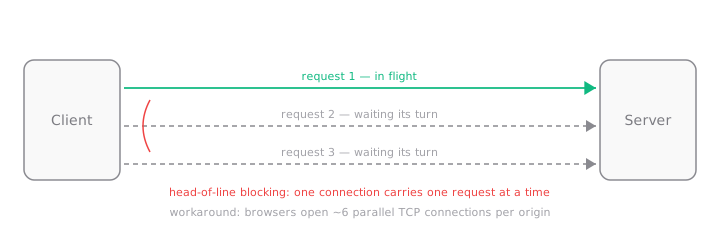 One slow response holds up everything behind it — this is head-of-line blocking.
This is called head-of-line blocking. Picture a single checkout lane at a store. If the person in front has a full cart, everyone behind them waits — even the guy holding a single pack of gum. One slow response holds up every request behind it.
Browsers worked around this with a hack: open multiple connections. Most browsers open up to ~6 parallel TCP connections per domain, so you get 6 "checkout lanes" instead of one. Better, but not free — each connection has setup cost (TCP handshake, then a TLS handshake for HTTPS), and 6 is a hard ceiling.
This single limitation is why front-end folks spent years doing things like:
- Bundling all JS into one file (fewer requests = less queuing).
- Spriting icons into one big image.
- Domain sharding — serving assets from
cdn1.site.com,cdn2.site.comto trick the browser into opening more than 6 connections.
Every one of those tricks exists to dodge HTTP/1.1's queue. Hold that thought, because HTTP/2 makes most of them pointless.
One more HTTP/1.1 quirk: headers are sent as plain text, uncompressed, on every single request. Cookies, user-agent strings, accept headers — the same kilobytes, repeated on all 100 requests. Wasteful, but nobody noticed much in 1997.
HTTP/2: send everything at once
HTTP/2 landed in 2015, and it came from a Google experiment called SPDY. Its headline feature fixes the exact pain we just described.
Multiplexing. A single HTTP/2 connection can carry many requests and responses at the same time, interleaved. No more waiting in line. You fire off 100 requests over one connection and the responses come back as they're ready, in any order.
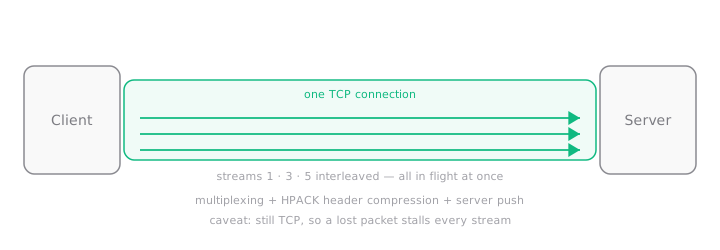 One connection, many streams in flight at once — no more request queue.
Think of it like upgrading from that single checkout lane to one cashier who can juggle everyone's items simultaneously. Each request becomes a stream with its own ID, and streams share one connection happily.
HTTP/2 brought a few more upgrades:
- Header compression (HPACK). Instead of resending the same headers as plaintext every time, HTTP/2 compresses them and remembers what it already sent. Those repeated cookies? Sent once, referenced after.
- Binary framing. HTTP/1.1 is text; HTTP/2 is binary. Computers parse binary faster and more reliably.
- Stream prioritization. The browser can hint that your CSS matters more than a below-the-fold image, so critical stuff arrives first.
- Server push. The server could proactively send resources you hadn't asked for yet. (This sounded great but was hard to use well — Chrome eventually removed support for it. Don't lose sleep over it.)
Because one connection now does the work of six, most old HTTP/1.1 tricks became unnecessary or even harmful. Domain sharding? Now it hurts, because you're splitting requests across connections that could've shared one. Aggressive bundling? Less important, since many small files no longer clog a queue.
But HTTP/2 has a catch, and it's a sneaky one.
It still runs on TCP. And TCP guarantees packets arrive in order. So if one packet gets lost on the network, TCP holds back every stream until that packet is re-sent — even streams that had nothing to do with the lost packet.
We fixed head-of-line blocking at the HTTP layer... and it came back at the TCP layer. On a clean fast connection you'll never notice. On a flaky mobile network with packet loss? It bites. That's the exact problem HTTP/3 was built to kill.
HTTP/3: rebuild the foundation with QUIC
Here's where it gets interesting. The HTTP/3 folks looked at that TCP problem and made a bold call: stop using TCP.
HTTP/3 runs on a new transport protocol called QUIC, which is built on top of UDP. If TCP is the careful courier who insists on delivering packages in strict order, UDP is the courier who just throws packages over the fence — fast, but no ordering guarantees. QUIC adds smart logic on top of UDP to get reliability without TCP's rigid "everything waits in order" rule.
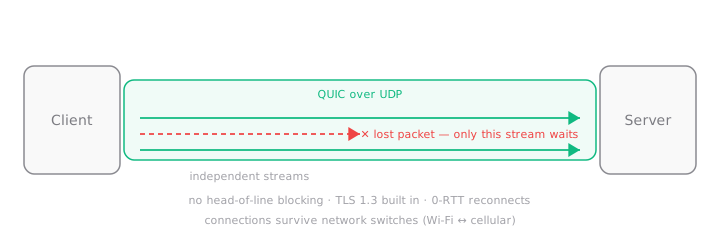 A lost packet only stalls its own stream — the rest keep flowing.
The payoff: each stream is truly independent. A lost packet only stalls the one stream that needed it. Every other stream keeps flowing. Real head-of-line blocking is finally gone, end to end.
QUIC brings some genuinely clever wins:
- Faster handshakes. With TCP + TLS you pay for two handshakes before any data moves. QUIC folds the connection setup and the TLS 1.3 handshake together, so you start sending data sooner.
- 0-RTT reconnection. If you've talked to a server before, QUIC can resume and send data on the very first packet. Zero round trips of waiting. Repeat visits feel instant.
- Encryption is not optional. TLS 1.3 is baked into QUIC. There is no unencrypted HTTP/3. Security comes standard.
- Connection migration. This one's my favorite. A QUIC connection is tied to a connection ID, not to your IP address. So when your phone switches from Wi-Fi to cellular, the connection survives. No dropped download, no reloaded video. With TCP, changing networks kills the connection.
That last point is why HTTP/3 shines on mobile. If you've ever walked out of your house and watched a video stall the instant you left Wi-Fi range — that's a TCP connection dying. QUIC just... keeps going.
HTTP/3 became an official standard in 2022 and now has broad browser support (Chrome, Edge, Firefox, Safari) and is served by Cloudflare, Google, and most big CDNs.
The evolution at a glance
Zooming out, each version solved the previous one's biggest headache:
| Problem | Fixed by | How |
|---|---|---|
| Requests wait in a queue | HTTP/2 | Multiplexing over one connection |
| Repeated plaintext headers | HTTP/2 | HPACK header compression |
| TCP-level head-of-line blocking | HTTP/3 | Independent streams over QUIC |
| Slow handshakes | HTTP/3 | Combined QUIC + TLS 1.3 setup, 0-RTT |
| Connections die when you switch networks | HTTP/3 | Connection migration via connection IDs |
The full comparison table
Here's everything side by side — bookmark this one:
| Feature | HTTP/1.1 | HTTP/2 | HTTP/3 |
|---|---|---|---|
| Released | 1997 | 2015 | 2022 |
| Transport protocol | TCP | TCP | QUIC (over UDP) |
| Performance | Slowest | Fast | Fastest, esp. on lossy networks |
| Multiplexing | No (one request per connection) | Yes (streams on one TCP connection) | Yes (fully independent streams) |
| Head-of-line blocking | Yes, at HTTP layer | Yes, at TCP layer | None |
| Header compression | None (plaintext) | HPACK | QPACK |
| Connection type | Multiple short-lived connections | Single long-lived connection | Single connection, survives IP changes |
| Handshake cost | TCP + TLS (2 round trips) | TCP + TLS (2 round trips) | Combined, often 1-RTT or 0-RTT |
| Latency | High | Lower | Lowest |
| Security | Optional TLS | Optional TLS (HTTPS in practice) | Mandatory TLS 1.3 |
| Browser support | Universal | Universal | Broad (all modern browsers) |
| Best for | Legacy systems, simple APIs | Modern sites, most apps today | Mobile, video, global low-latency apps |
Okay, but how does my JavaScript use any of this?
This is the part I wish someone had told me sooner, so let me be blunt about it:
As a JavaScript developer, you don't pick the HTTP version. The browser and server negotiate it for you.
When your browser connects to an HTTPS server, they do a quiet handshake using something called ALPN (Application-Layer Protocol Negotiation). It's basically the browser saying "I can do HTTP/2 and HTTP/3, what about you?" and the server replying "let's use HTTP/3." All automatic, all invisible to your code.
So this line:
// You write this...
const res = await fetch("https://api.example.com/users");
const users = await res.json();

// ...and the browser might send it over HTTP/1.1, HTTP/2, or HTTP/3.
// Your code looks identical either way.
The exact same fetch() call runs over any version. You cannot tell from the code, and — here's the kicker — you cannot force it either. More on that misconception in a bit.
Let me show the common ways we make requests and where the protocol actually gets decided.
Using fetch()
The fetch() API is your everyday tool. It knows nothing about HTTP versions, and that's by design:
async function getUser(id) {
  const res = await fetch(`https://api.example.com/users/${id}`);

  if (!res.ok) {
    throw new Error(`Request failed: ${res.status}`);
  }

  return res.json();
}
Nothing here mentions HTTP/2 or HTTP/3, and nothing can. The browser handles negotiation underneath. If the server supports HTTP/3, your fetch() quietly gets all the multiplexing and low-latency benefits — for free, with zero code changes. That's the whole point: the performance upgrade is on the server side, not in your JavaScript.
Using Axios
Axios is the popular request library, and in the browser it's just a friendlier wrapper around the same machinery:
import axios from "axios";

async function getUser(id) {
  const { data } = await axios.get(`https://api.example.com/users/${id}`);
  return data;
}
Same story. In the browser, Axios uses the browser's networking, so the HTTP version is negotiated automatically. You get whatever the browser and server agreed on.
One nuance worth knowing: Axios running in Node.js is different. There, Axios uses Node's HTTP stack, which historically speaks HTTP/1.1 by default. So the browser and the server-side behavior aren't the same — a detail that trips people up when they assume "Axios = HTTP/2 everywhere." It doesn't.
Using the Node.js HTTP module
When you write server-side code or scripts, the built-in http module talks HTTP/1.1:
const http = require("node:http");

// A simple HTTP/1.1 server
const server = http.createServer((req, res) => {
  res.writeHead(200, { "Content-Type": "application/json" });
  res.end(JSON.stringify({ message: "Hello over HTTP/1.1" }));
});

server.listen(3000, () => {
  console.log("HTTP/1.1 server running on http://localhost:3000");
});
This is HTTP/1.1, plain and simple. It's perfect for internal services, quick tools, and APIs sitting behind a proxy. Which leads to a pattern you'll see constantly in production.
Running an HTTP/2 server in Node.js
Node has a separate http2 module. Here's a minimal Node.js HTTP/2 example — note it needs TLS certificates, because browsers only speak HTTP/2 over HTTPS:
const http2 = require("node:http2");
const fs = require("node:fs");

// HTTP/2 in browsers requires TLS, so we need a cert + key.
const server = http2.createSecureServer({
  key: fs.readFileSync("localhost-key.pem"),
  cert: fs.readFileSync("localhost-cert.pem"),
});

server.on("stream", (stream, headers) => {
  // Each request is a "stream" — the multiplexing we talked about, in code.
  stream.respond({
    "content-type": "application/json",
    ":status": 200,
  });
  stream.end(JSON.stringify({ message: "Hello over HTTP/2" }));
});

server.listen(8443, () => {
  console.log("HTTP/2 server running on https://localhost:8443");
});
Notice the API talks in streams, not just request/response. That word — stream — is the multiplexing concept made concrete. Each browser request becomes a stream on the same connection.
You can generate local certs for testing with a tool like mkcert, which handles the annoying certificate-trust dance for you.
What about HTTP/3 in Node.js?
Honest answer: as of now, HTTP/3 support in Node.js is still experimental. There's a QUIC implementation in progress, but it's not something I'd reach for in production yet.
And here's the good news — you almost never need to. In the real world, HTTP/3 is handled at the edge:
Browser ⇄ HTTP/3 (QUIC) ⇄ CDN / Load balancer ⇄ HTTP/1.1 or HTTP/2 ⇄ Your Node appYour users talk HTTP/3 to Cloudflare or your CDN. The CDN talks plain HTTP/1.1 or HTTP/2 to your actual Node server. You flip a switch in your CDN dashboard and your whole app gets HTTP/3 — without touching a line of application code. That's genuinely how most sites ship it, including big ones.
Common misconceptions (I believed some of these)
Let me clear up the myths I see repeated all the time.
"I can make fetch() use HTTP/2 or HTTP/3."
No, you can't. There is no option, header, or flag for it. The browser negotiates the version based on what the server supports. Your JavaScript has zero say. If you want HTTP/3, you configure the server or CDN — full stop.
"HTTP/2 makes bundling pointless, so ship 500 tiny files." Easy there. Multiplexing removes the queuing penalty of many requests, but every file still has overhead — compression works better on larger files, and there's still per-request cost. The modern sweet spot is a few reasonably-sized chunks, not one giant bundle and not a thousand tiny ones.
"HTTP/3 is always faster." Usually, but not by magic. On a fast, stable connection, HTTP/2 and HTTP/3 feel about the same. HTTP/3's advantage shows up under packet loss and network changes — mobile, spotty Wi-Fi, long distances. That's where it pulls ahead.
"HTTP/2 requires HTTPS by spec." Technically the spec allows plaintext HTTP/2, but every browser refuses to do it. So in practice, HTTP/2 means HTTPS. HTTP/3 genuinely requires encryption — it's mandatory in QUIC.
"Server push will speed up my site."
It sounded promising, but it was hard to use without wasting bandwidth, and Chrome removed support. Use <link rel="preload"> and resource hints instead.
Real-world scenarios: when does the upgrade actually matter?
Theory is nice, but here's where you'd feel the difference.
A media-heavy landing page. Fifty images, a dozen scripts, some fonts. On HTTP/1.1 they queue through 6 connections and the page assembles slowly. On HTTP/2 they all download over one connection at once — noticeably faster first paint. This is the clearest HTTP/2 win.
A mobile app on a shaky network. User's on a train, signal drops in and out, packets get lost. HTTP/2's TCP head-of-line blocking makes every stream stutter together. HTTP/3 keeps unaffected streams moving. The app feels resilient instead of frozen.
Video streaming while moving. Walking from Wi-Fi to cellular mid-video: TCP drops the connection and the player re-buffers. HTTP/3's connection migration keeps the same connection alive across the network switch. No stall.
A chatty single-page app. An SPA firing 30 API calls on load benefits massively from multiplexing — HTTP/2 or HTTP/3 send them concurrently instead of queuing. If your dashboard makes a lot of parallel requests, this is real.
A simple internal microservice. Two services talking on a fast, reliable data-center network? HTTP/1.1 is completely fine. Don't over-engineer it.
Performance tips for each protocol
Practical things I actually do, per version:
If you're stuck on HTTP/1.1 (legacy servers, some internal tools):
- Bundle aggressively — fewer requests genuinely helps here.
- Use a CDN so connections are short and close to the user.
- Inline critical CSS to avoid an extra round trip.
On HTTP/2:
- Stop domain sharding. It splits requests across connections and hurts now.
- Ease up on bundling — several medium chunks beat one monster bundle, and they cache better.
- Keep using HTTPS (you have no choice anyway) and let multiplexing do the work.
- Don't rely on server push; use
preloadhints instead.
On HTTP/3:
- Just enable it at your CDN — that's 90% of the effort.
- Make sure TLS 1.3 is on (it comes with QUIC, but verify your setup).
- It's especially worth it if you have a global or mobile-heavy audience.
Best practices for modern web apps
If I had to compress everything into a short checklist:
- Serve over HTTPS. It's the entry ticket for HTTP/2 and HTTP/3. No HTTPS, no upgrades.
- Put a CDN in front of your app. This is the single easiest way to get HTTP/2 and HTTP/3 without code changes.
- Don't hand-tune for a specific version. Write clean requests and let negotiation happen.
- Drop the old HTTP/1.1 hacks — domain sharding and extreme bundling can backfire on modern protocols.
- Bundle in moderation. A handful of cache-friendly chunks is the goal.
- Measure on real devices and networks. Chrome DevTools shows the protocol per request (add the "Protocol" column in the Network tab — you'll see
h2andh3there).
When should you use which?
A quick decision guide, since "it depends" is a useless answer:
- Use HTTP/1.1 when you're dealing with legacy systems, a basic internal API, or service-to-service calls on a reliable network. It's simple and it works.
- Use HTTP/2 as your sensible default for public-facing web apps. Broad support, big multiplexing win, easy to enable. If you do nothing else, get here.
- Use HTTP/3 when your audience is global or mobile-heavy, you serve media or video, or low latency is a real feature. Turn it on at the CDN and let it ride.
Honestly? For most projects the winning move is: HTTPS + a good CDN with HTTP/2 and HTTP/3 enabled. That gets you the best of all worlds with almost no effort, and you go back to writing features.
Key takeaways
If you remember nothing else:
- HTTP/1.1 makes requests wait in line. All those old bundling and sharding tricks exist to dodge that queue.
- HTTP/2 multiplexes requests over one connection and compresses headers — a huge, easy win. But it still suffers TCP head-of-line blocking under packet loss.
- HTTP/3 runs on the QUIC protocol over UDP, killing head-of-line blocking, speeding up handshakes, and surviving network switches. It's the mobile champion.
- Your JavaScript doesn't choose — the browser and server negotiate automatically. You get the upgrade by configuring the server or CDN, not by changing
fetch().
I went from ignoring HTTP entirely to treating "enable HTTP/2 and HTTP/3 at the edge" as a default first step on every project. It's one of the highest-leverage, lowest-effort performance moves you can make.
FAQ (a.k.a. the HTTP interview questions you'll get asked)
Q: What's the single biggest difference between HTTP/1.1 and HTTP/2? Multiplexing. HTTP/1.1 handles one request per connection at a time; HTTP/2 sends many requests concurrently over a single connection, eliminating the request queue.
Q: Why does HTTP/3 use UDP instead of TCP? Because TCP forces packets to arrive in strict order, which causes head-of-line blocking — one lost packet stalls every stream. HTTP/3 uses QUIC over UDP so streams are independent, and a lost packet only affects its own stream.
Q: What is the QUIC protocol? QUIC is the transport protocol HTTP/3 runs on. It's built on UDP, adds reliability and congestion control, bundles in TLS 1.3 encryption, supports 0-RTT reconnection, and allows connections to survive network changes.
Q: Can I force fetch() to use HTTP/2 or HTTP/3?
No. The version is negotiated between browser and server via ALPN. Your client code has no control — you enable newer versions on the server or CDN.
Q: Is HTTP/2 faster than HTTP/1.1 for APIs? Usually yes, especially when the client makes many parallel requests, thanks to multiplexing and header compression. For a single occasional request on a fast network, the difference is small.
Q: Do I need to rewrite my app to use HTTP/3? No. In almost all cases you enable HTTP/3 at your CDN or load balancer and your application code stays exactly the same.
Q: Does HTTP/2 require HTTPS? The spec technically allows plaintext, but all browsers require HTTPS for HTTP/2 — so in practice, yes. HTTP/3 requires encryption by design.
Q: What happened to HTTP/2 server push?
It was hard to use efficiently and often wasted bandwidth. Chrome removed support for it. Use <link rel="preload"> and other resource hints instead.
Q: How do I check which HTTP version a site is using?
Open Chrome DevTools → Network tab → right-click the column headers → enable "Protocol." You'll see http/1.1, h2, or h3 next to each request.
Q: Is HTTP/1.1 obsolete? Not at all. It's still everywhere and perfectly fine for simple APIs and internal, reliable networks. It's just no longer the best choice for public-facing, performance-sensitive sites.