Mar 16, 2026 · 10 min read
Caching in System Design: Strategies, Types, and Scaling Techniques
In the world of system design, caching is a reliability strategy, not just a performance optimization. A deep dive into caching layers, strategies, and scaling challenges.
In the world of system design, caching is a reliability strategy, not just a performance optimization. While a database is your "source of truth," at a massive scale, it becomes your primary bottleneck. Effective caching requires the architectural discipline to manage data state across a distributed environment without compromising accuracy.
In this blog, we will explore the concept of caching in detail, including how it works, when to use it, different caching strategies, and how it helps scale modern systems efficiently.
What is Caching?
Before going deeper, let's first understand what caching actually means.
Caching is a technique used in computer systems to store a copy of frequently accessed data in a fast storage layer, so it can be retrieved quickly without repeatedly fetching it from the original source such as a database or external service.
You can think of a cache as a small, high-speed storage area that keeps commonly used data ready for immediate access. Instead of performing the same expensive operation again and again, the system simply retrieves the stored result from the cache.
Why Caching is Important
Caching plays a crucial role in improving the performance of modern applications.
First, it reduces latency, meaning users receive responses much faster because the system retrieves data from a fast memory layer rather than performing slower operations like database queries.
Second, it reduces load on backend systems such as databases or external APIs. When many requests are served from the cache, the backend systems have to process far fewer requests.
Caching also improves scalability. Applications can handle a much larger number of users because repeated requests for the same data are served from the cache instead of the database.
When to Implement Caching
Caching should never be the first solution to a performance problem. Before introducing a cache, verify that the bottleneck isn't simply a poorly indexed query or a suboptimal database schema.
The Ideal Candidates for Caching
- The "Hot" Key: Scenarios where a tiny fraction of your data (e.g. a viral post) accounts for the vast majority of your traffic.
- Immutable Metadata: Data that rarely, if ever, changes (e.g., country codes, tax brackets, or static UI strings).
- Expensive Aggregations: Complex results that require joining multiple large tables or heavy mathematical computation (e.g., a "Top 10" leaderboard).
The Litmus Test: If your database CPU is under 20% and your p99 latency is within acceptable limits, do not cache. Introducing a cache creates a secondary source of truth, which increases the risk of data inconsistency and system complexity.
Multi-Layered Caching (Types of Cache Layers)
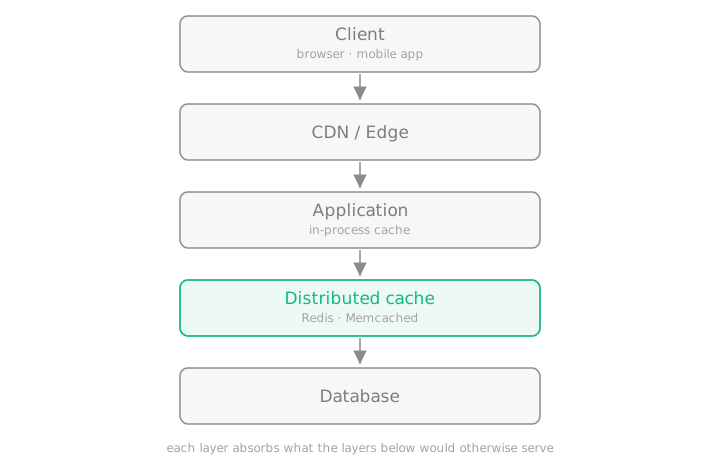 Each layer absorbs the requests the layers below it would otherwise have to serve.
In real systems, we usually don't rely on just one cache. Instead, we use multiple layers of caching, often called a cache hierarchy, where each layer helps reduce load on the next one.
Layer 1: Edge Cache (CDN & Browser)
The fastest request is the one that never reaches your servers. CDNs like Cloudflare or Akamai and browser caching store static content such as images, CSS, and JavaScript close to the user. By using proper cache headers (like immutable headers for versioned files), browsers can reuse assets without even checking the server again, making page loads much faster.
Layer 2: In-Process Cache (L1 Cache)
This cache lives inside the application server's memory (for example, using a local HashMap). Since it runs directly in RAM, it is extremely fast, usually taking less than a millisecond to retrieve data.
However, this cache is local to each server. If you have 50 servers, each one has its own copy of the data. Because of this, it is best used for static configurations or data that can tolerate small inconsistencies for a short time.
Layer 3: Distributed Cache
This is a shared cache used by all application servers, typically implemented using systems like Redis or Memcached. Unlike local caches, a distributed cache ensures that all servers access the same cached data, helping maintain consistency across the system while still providing fast access compared to databases.
Caching Strategies
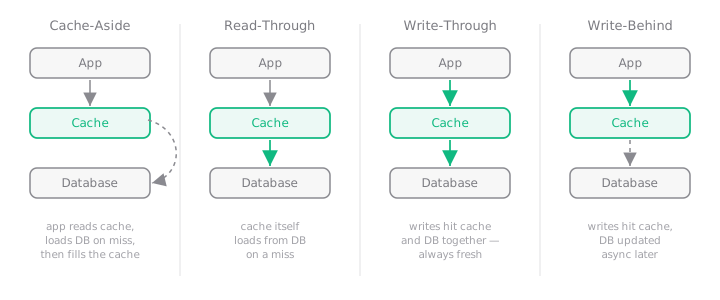 Read strategies (cache-aside, read-through) vs. write strategies (write-through, write-behind).
This is where I see most designs fail. Choosing the wrong strategy leads to either a crashed database or "stale" data that makes users angry.
1. Cache-Aside (Lazy Loading)
Cache-Aside, also known as Lazy Loading, is a commonly used caching strategy where the application manages both the cache and the database.
When a request arrives, the application first checks the cache.
- If the data is found (cache hit), it is returned immediately.
- If not (cache miss), the application fetches the data from the database, stores it in the cache, and then returns it.
This strategy works best when read operations are much higher than writes and the data does not change frequently.
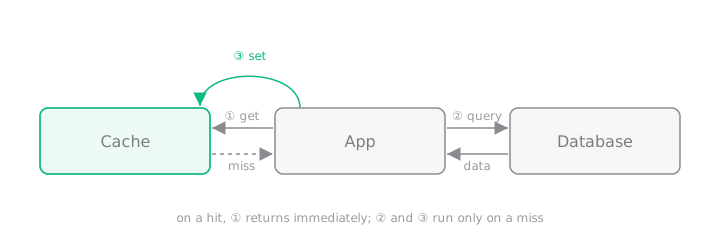 On a hit, step ① returns immediately; steps ② and ③ run only on a miss.
Example: In an online learning platform, when a student opens a course page, the application first checks the cache for the course details. If the data is not present, it retrieves it from the database, stores it in the cache, and serves it to the user. Future requests are then served directly from the cache.
Challenge: Thundering Herd Problem
One common issue with the cache-aside strategy is the Thundering Herd problem.
Imagine a scenario where cached data for a popular resource suddenly expires. If thousands of users request that same data at the exact moment it expires, every request will experience a cache miss and attempt to retrieve the data from the database simultaneously.
This sudden surge of database requests can overwhelm the system and degrade performance.
Solution: Locking Mechanism
To mitigate this problem, systems often use a locking mechanism.
When the first request detects that the data is missing from the cache, it acquires a lock and proceeds to fetch the data from the database. While this process is happening, other incoming requests wait briefly instead of querying the database themselves.
Once the first request finishes retrieving the data and stores it in the cache, the waiting requests can read the data directly from the cache.
This approach ensures that only one request accesses the database, while the others benefit from the cached result shortly afterward.
2. Read-Through Caching
Read-through caching is a strategy where the cache automatically fetches data from the database if it is not present in the cache. The application interacts only with the cache layer.
If the data exists in the cache, it is returned immediately. If it is missing, the cache retrieves it from the database, stores it, and then returns it to the application. This keeps the application logic simple since it does not need to handle database queries or cache updates.
Example: In an e-commerce platform, when a user requests product details, the application asks the cache. If the product data is cached, it is returned instantly. If not, the cache fetches it from the database, stores it, and serves it. Future requests are then handled directly from the cache.
3. Write-Through Caching
Write-through caching is a strategy where every write operation is updated in both the cache and the database at the same time. When the application modifies data, it writes the change to the cache and then persists it to the database.
Since both layers are updated together, the cache always contains the latest version of the data, reducing the chances of serving stale information.
Example: In an online user profile system, when a user updates their profile (like changing their name or photo), the application updates both the database and the cache simultaneously. When others view the profile, the system can safely read the latest data directly from the cache.
4. Write-Behind Caching
Write-Behind Caching (Write-Back Caching) is a strategy where write operations are first stored in the cache, and the cache updates the database asynchronously after a short delay. This improves write performance because the application does not wait for the database to complete the write operation. It is useful in systems with very high write traffic where reducing database load is important. However, there is a risk of data loss if the cache fails before the data is written to the database.
Example: In a social media platform, when users click the "like" button on a post, the likes are first stored in the cache and later batch-updated to the database.
5. Refresh-Ahead Caching
Refresh-Ahead Caching is a strategy where the cache refreshes data before it expires, usually using a background process. Instead of waiting for a cache miss, the system updates the cached data proactively so it remains fresh and available. This reduces latency because users always receive data directly from the cache. It works best when data is accessed frequently and access patterns are predictable.
Example: In a news website, the list of trending articles is refreshed in the cache every few minutes before expiration so users always see updated content instantly.
With a Refresh-Ahead strategy, the system refreshes the trending headlines in the cache shortly before the cached data expires. As a result, when users visit the homepage, the latest trending articles are already available in the cache and can be delivered instantly without waiting for the backend system to recompute them.
Scaling and the "Invalidation Nightmare"
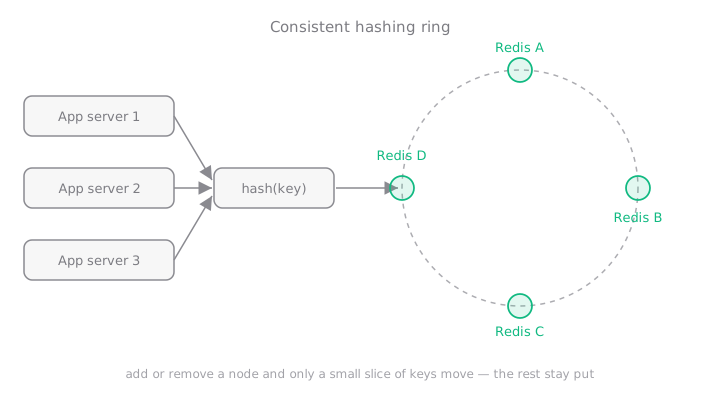 Consistent hashing maps keys onto a ring so that adding a node moves only a small slice of them.
Scaling a cache isn't just about throwing more RAM at the problem. As your traffic grows, the real challenge is how you distribute data across multiple servers and, more importantly, how you get rid of it when it's no longer true.
Scaling with Consistent Hashing
In a distributed setup, you might have four different Redis servers. How do you decide which server holds user:123?
If you use simple math like hash(key) % total_servers, you run into a disaster the moment you add a new server. Because the "total servers" count changes, every single key in your system suddenly points to the wrong location. Your cache hit rate drops to zero, and your database gets crushed by the sudden spike in traffic.
The Solution: We use Consistent Hashing. This maps keys and servers to a virtual "ring." When you add or remove a server, only a tiny fraction of your data needs to move. This keeps your system stable and your database safe during scaling.
The Invalidation Nightmare
There is a famous saying in engineering: "There are only two hard things in Computer Science: cache invalidation and naming things." Keeping your cache in sync with your database is incredibly difficult.
There are two primary ways to handle this:
- TTL (Time To Live): You give every piece of data an expiration date (e.g., "This expires in 5 minutes"). It's the safest method, but it means users might see "stale" or old data until the timer runs out.
- Explicit Purge: You manually delete the cache key the exact moment the database is updated. While this keeps data fresh, it is very hard to coordinate in complex systems where many different services are talking to each other.
Common Pitfalls
- Caching Sensitive Data: Putting unencrypted PII in Redis.
- The Cache Avalanche: Setting all your keys to expire at 12:00 AM. When midnight hits, the DB dies. Always add "Jitter" (randomness) to your TTLs.
- Caching "Nulls": If a user doesn't exist, cache that "Null." If you don't, hackers will spam non-existent IDs to bypass your cache and hit your DB every time.